

八向移动
文章目录
Ciallo ~(∠・ω< )⌒★!
本文讨论基于学习用的 ALSCPP 项目:
GitHub - aizawaayame/OnaGameSample: Rewrite the ALS project using C++.
1. 问题
在项目中我们有以下问题:
- 如何在缺少具有方向的八向动画下实现转向?
- 如何解决极端变换下导致的臀位扭转穿帮?
- 如何实现轴心切换时的前倾和后仰?
2. 思路
2.1. 转向思路
ALS 的只有六个动画。
分别是正前,正后,左进,左退,右进,右退。实际上只有四个方向的动画。
为了实现八向动画引入 YawOffset 来实现实际的转向。这个 YawOffset 会在代码中读取,并用于修改角色的 Rot。
2.2. 臀位思路
构建六向状态机,通过构造环形变换来限制极端变换的出现。这个见后文实现部分的描述。
2.3. 轴心切换思路
实现轴心切换可以在部分状态机切换时触发”pivot”事件,来添加前倾和后仰。后文的状态机切换部分会进行描述。
3. 实现
3.1. 数据
digraph G { graph [rankdir="TB"]; // Assuming a Top-to-Bottom layout
// Define central nodes (adjust names based on the image) node [shape=ellipse, style=filled, fillcolor=lightblue]; central_node1 [label="Data"];
// Define intermediate nodes (adjust names and shapes) node [shape=box, style=rounded]; intermediate_a [label="Movement Data"]; intermediate_b [label="Anim Curve"]; intermediate_c [label="Anim Skeleton"];
// Define leaf nodes (adjust names and shapes) node [shape=plaintext]; leaf_1 [label="MovementDirection"]; leaf_2 [label="VelocityBlend"]; leaf_3 [label="Feet_Crossin"]; leaf_4 [label="HipOrientation_Bias"]; leaf_YawOffset [label="YawOffset"]; leaf_5 [label="Blend Profile"];
// Define edges and their directions central_node1 -> intermediate_a; central_node1 -> intermediate_b; central_node1 -> intermediate_c;
intermediate_a -> leaf_1; intermediate_a -> leaf_2;
intermediate_b -> leaf_3; intermediate_b -> leaf_4; intermediate_b -> leaf_YawOffset
intermediate_c -> leaf_5;
// You might need to add more nodes and edges based on the image. // You can also customize node shapes, colors, and labels further.}3.1.1. Movement 数据
3.1.1.1. 移动方向 MovementDirection
digraph direction_diagram { // 设置图形属性 bgcolor="#e0f0e0"; layout=neato; size="6,6";
// 隐藏默认节点和边的样式 node [shape=none, fontname="Arial", fontsize=16]; edge [color=blue, arrowhead=none];
// 主要方向标签 F [pos="0,2.5!", label="F", fontsize=24]; B [pos="0,-2.5!", label="B", fontsize=24]; L [pos="-2.5,0!", label="L", fontsize=24]; R [pos="2.5,0!", label="R", fontsize=24];
// 坐标轴标签 X [pos="0.3,1.5!", label="x", fontsize=14]; Y [pos="1.5,-0.2!", label="y", fontsize=14];
// 象限标签 FL [pos="-1.2,1.2!", label="FL"]; FR [pos="1.2,1.2!", label="FR"]; BL [pos="-1.2,-1.2!", label="BL"]; BR [pos="1.2,-1.2!", label="BR"];
// 角度标签 angle70 [pos="0.5,0.3!", label="70°", fontsize=14]; angle110 [pos="0.8,-0.3!", label="110°", fontsize=14]; angle_neg70 [pos="-0.5,0.3!", label="-70°", fontsize=14]; angle_neg110 [pos="-0.8,-0.3!", label="-110°", fontsize=14];
// 坐标原点(隐藏) origin [pos="0,0!", shape=point, width=0.01, style=invis];
// 坐标轴 origin -> F [pos="0,0 0,2.5", color=blue, penwidth=1.5, arrowhead=normal]; origin -> R [pos="0,0 2.5,0", color=blue, penwidth=1.5, arrowhead=normal];
// 左区域框 left_box_tl [pos="-2.2,1.7!", shape=point, width=0.01, style=invis]; left_box_tr [pos="-0.7,1.7!", shape=point, width=0.01, style=invis]; left_box_bl [pos="-2.2,-1.7!", shape=point, width=0.01, style=invis]; left_box_br [pos="-0.7,-1.7!", shape=point, width=0.01, style=invis];
left_box_tl -> left_box_tr -> left_box_br -> left_box_bl -> left_box_tl [color=blue, penwidth=2];
// 右区域框 right_box_tl [pos="0.7,1.7!", shape=point, width=0.01, style=invis]; right_box_tr [pos="2.2,1.7!", shape=point, width=0.01, style=invis]; right_box_bl [pos="0.7,-1.7!", shape=point, width=0.01, style=invis]; right_box_br [pos="2.2,-1.7!", shape=point, width=0.01, style=invis];
right_box_tl -> right_box_tr -> right_box_br -> right_box_bl -> right_box_tl [color=blue, penwidth=2];
// 对角线(红色) dl1 [pos="-2.5,2.5!", shape=point, width=0.01, style=invis]; dl2 [pos="2.5,-2.5!", shape=point, width=0.01, style=invis]; dl3 [pos="-2.5,-2.5!", shape=point, width=0.01, style=invis]; dl4 [pos="2.5,2.5!", shape=point, width=0.01, style=invis];
dl1 -> dl2 [color=red, penwidth=1.5]; dl3 -> dl4 [color=red, penwidth=1.5];
// 角度弧线标记 arc1 [pos="0.3,0.3!", shape=point, width=0.01, style=invis]; arc2 [pos="0.3,-0.3!", shape=point, width=0.01, style=invis]; arc3 [pos="-0.3,0.3!", shape=point, width=0.01, style=invis]; arc4 [pos="-0.3,-0.3!", shape=point, width=0.01, style=invis];
arc1 -> arc2 -> arc4 -> arc3 -> arc1 [color=blue, style=dashed, penwidth=0.5];}计算 VelocityBlend 分为两步:
计算当前 ControlledRotation 和 VelocityRotation 之间的插值 Delta
根据 Delta 决定当前的移动方向
3.1.1.2. 速度混合 VelocityBlend
计算 VelocityBlend 分为两步:
计算目标 VelocityBlend (TargetBlend)
插值 VelocityBlend
3.1.1.2.1. 获取 TargetBlend
const FVector LocRelativeVeclocityDir = CharacterInformation.CharacterActorRotation.UnrotateVector(CharacterInformation.Velocity.GetSafeNormal(0.1f));
const float Sum = FMath::Abs(LocRelativeVeclocityDir.X) + FMath::Abs(LocRelativeVeclocityDir.Y) + FMath::Abs(LocRelativeVeclocityDir.Z);const FVector RelativeDir = LocRelativeVeclocityDir / Sum;FOnaVelocityBlend TargetBlend;TargetBlend.F = FMath::Clamp(RelativeDir.X, 0.0f, 1.0f);TargetBlend.B = FMath::Abs(FMath::Clamp(RelativeDir.X, -1.0f, 0.0f));TargetBlend.L = FMath::Abs(FMath::Clamp(RelativeDir.Y, -1.0f, 0.0f));TargetBlend.R = FMath::Clamp(RelativeDir.Y, 0.0f, 1.0f);向量归一化:
将速度向量归一化后从世界坐标系转换到角色的局部坐标系:
const FVector LocRelativeVeclocityDir = CharacterInformation.CharacterActorRotation.UnrotateVector(CharacterInformation.Velocity.GetSafeNormal(0.1f));混合方向权重:
计算局部空间速度向量各分量绝对值的总和。这里使用绝对值是为了处理负方向值:const float Sum = FMath::Abs(LocRelativeVeclocityDir.X) + FMath::Abs(LocRelativeVeclocityDir.Y) + FMath::Abs(LocRelativeVeclocityDir.Z);
将局部空间速度向量除以前面计算的绝对值总和,得到一个特殊的”归一化”向量:const FVector RelativeDir = LocRelativeVeclocityDir / Sum;
计算混合权重
3.1.1.2.2. 插值 TargetBlend
const FOnaVelocityBlend& TargetBlend = CalculateVelocityBlend();VelocityBlend.F = FMath::FInterpTo(VelocityBlend.F, TargetBlend.F, DeltaSeconds, Config.VelocityBlendInterpSpeed);VelocityBlend.B = FMath::FInterpTo(VelocityBlend.B, TargetBlend.B, DeltaSeconds, Config.VelocityBlendInterpSpeed);VelocityBlend.L = FMath::FInterpTo(VelocityBlend.L, TargetBlend.L, DeltaSeconds, Config.VelocityBlendInterpSpeed);VelocityBlend.R = FMath::FInterpTo(VelocityBlend.R, TargetBlend.R, DeltaSeconds, Config.VelocityBlendInterpSpeed);利用插值得到更加平滑的结果
3.1.2. 动画曲线
使用了HipOrientation_Bias(臀位朝向)与Feet_Crossing(是否交叉脚)让动画表现层更加顺滑。
使用 YawOffset 来实现旋转偏移。
3.1.2.1. 交叉脚曲线
Feet_Crossing:存在与ALS_N_[Walk, Run]_[LB, LF, RB, RF]中的曲线,功能是标识什么时候为交叉脚
1: 交叉脚,切换姿势会穿帮
0: 非交叉,可以正常进行姿势切换
3.1.2.2. 臀位朝向曲线
HipOrientation_Bias:臀部位置
<-0.5 臀位左
>0.5 臀位右
3.1.3. Blend Profile
3.2. 表现
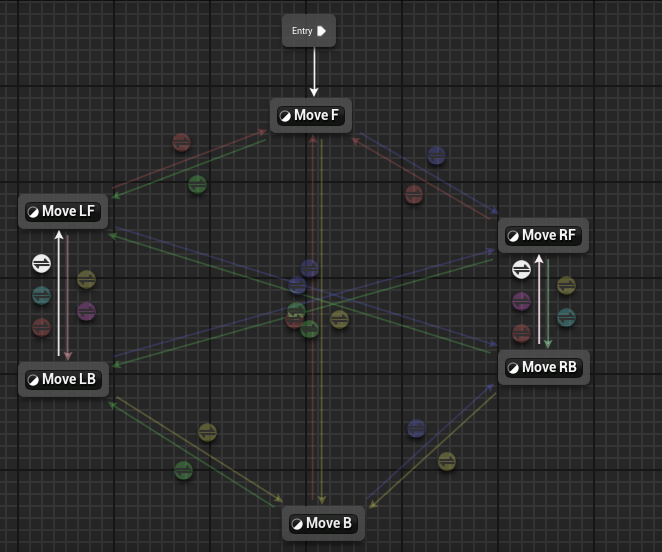
3.2.1. States
State 内均采用四方向融合。分别对应 VelocityBlend.F(B,R,L)。
拥有六种动画资源 F,B,FL,BL,FR,BR。
融合方式采用对角融合,F-B,FL-BR,FR-BL。对角融合才能正确的融合出臀部的位置。
这样融合方式应该是
Move F → F,B, FL,RL
Move B → F,B,FB,RB
Move LF → F,B,LF,RB
……
3.2.2. Transition
切换路径是有限制,跳变切换的路径被禁止:
如没有从 LF →RF 的路径; RF→B 必须途径 RB…
切换规则分为三类:
ChangeDirection:由玩家输入产生的移动意图决定,对操控立即响应,插值生效
SwitchHip:又臀位和交叉脚部判断让融合效果更加自然
3.2.2.1. ChangeDirection 移动意图变换
由 MoveDirection 变量决定,该变量在数据章节中有叙述。会在 NativeUpdateAnimation 中进行更新。
路径:这种方式的变换经历所有的合法的变换路径。
通知:在 F←>B,FR←>BL,FL←>BR 会添加”Pivot”事件,通知轴心进行了更改
3.2.2.2. SwitchHip 臀部变换
由 HipOrientation_Bias 和 Feet_Crossing 决定变换。
Feet_Crossing 是一个消极变量,只有当为 0 时才能切换。原因是交叉脚时转身会出现明显的穿帮。
在这个变换中,忽略脚部,观察 FL 和 FR,发现一个其实就是左扭屁股,一个是右扭屁股。这个就可以用于类似瞄准等场景。
路径:因为这是由臀位变换导致的,所以只有 FL<→FR,BL←>BR
4. Reference
ALS高级运动系统解析 03 八向移动
UE4 UE5 骨骼动画 高级运动系统 八向移动
AdvancedLocomotion 拆解笔记 1:移动
Site Unreachable
【新手向】虚幻4ARPG教程-重置版-第七集-使用弓箭时八方向移动状态_哔哩哔哩_bilibili
虚幻4(UE4) 动画技术 深入浅出 高级运动系统_哔哩哔哩_bilibili